Installation
To begin using the GLiNER model, you can install the GLiNER Python library through pip, conda, or directly from the source.
Install via Pip
pip install gliner
If you intend to use the GPU-backed ONNX runtime, install GLiNER with the GPU feature. This also installs the onnxruntime-gpu dependency.
pip install gliner[gpu]
Install via Conda
conda install -c conda-forge gliner
Install from Source
To install the GLiNER library from source, follow these steps:
-
Clone the Repository:
First, clone the GLiNER repository from GitHub:
git clone https://github.com/urchade/GLiNER -
Navigate to the Project Directory:
Change to the directory containing the cloned repository:
cd GLiNER -
Install Dependencies:
tipIt's a good practice to create and activate a virtual environment before installing dependencies:
python -m venv venv
source venv/bin/activate   # On Windows use: venv\Scripts\activate
Install the required dependencies listed in the
requirements.txtfile:pip install -r requirements.txt -
Install the GLiNER Package:
Finally, install the GLiNER package using the setup script:
pip install . -
Verify Installation:
You can verify the installation by importing the library in a Python script:
import gliner
print(gliner.__version__)
Install FlashDeBERTa
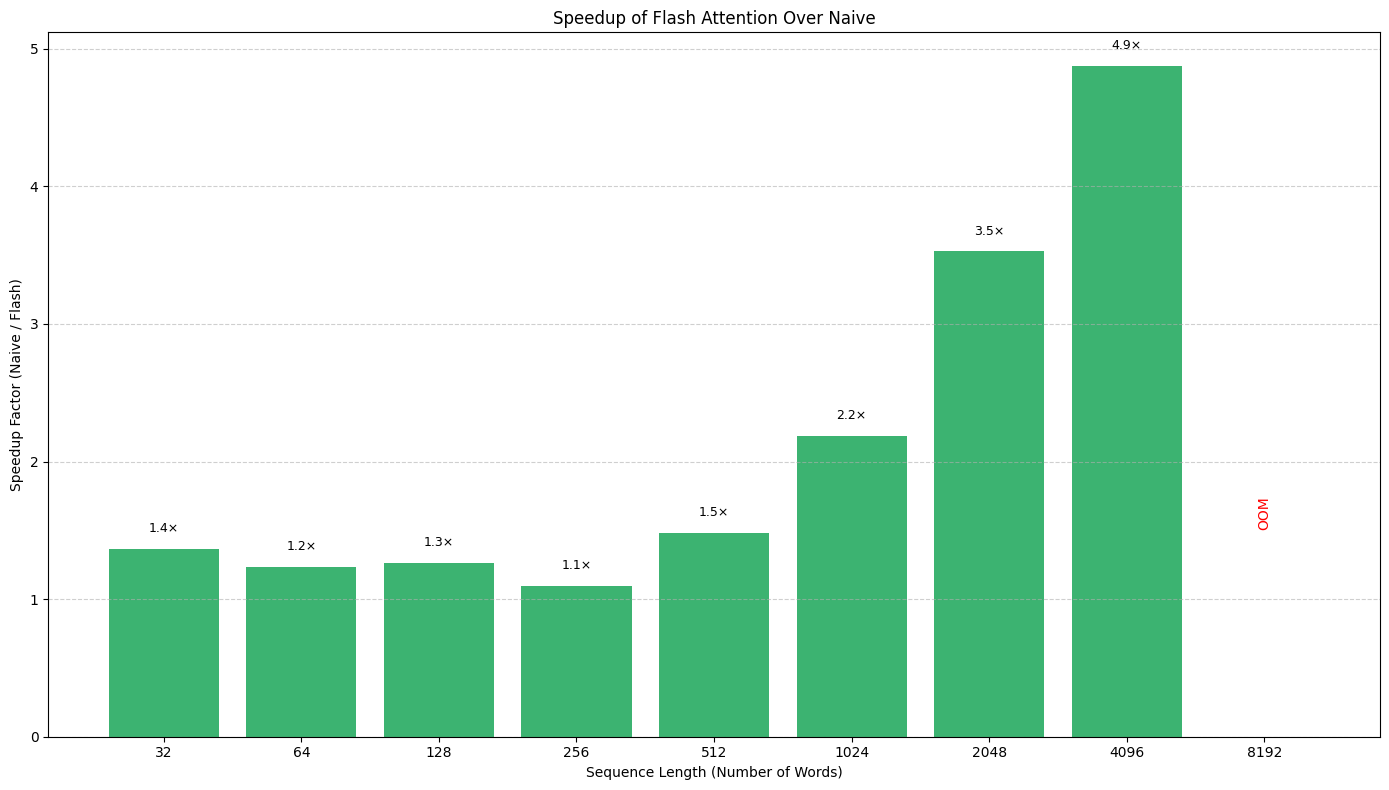
Most GLiNER models use the DeBERTa encoder as their backbone. This architecture offers strong token classification performance and typically requires less data to achieve good results. However, a major drawback has been its slower inference speed. We developed FlashDeBERTa to combine the good performance of the model and bring a new level of efficiency.
To use FlashDeBERTa with GLiNER, install it:
pip install flashdeberta -U
Before using FlashDeBERTa, please make sure that you have transformers>=4.47.0.
You need to export the environment variable to enable the usage of FlashDeBERTa: export USE_FLASHDEBERTA=1. And then you can export the GLiNER model, and it will automatically use FlashDeBERTa kernels.
model = GLiNER.from_pretrained("knowledgator/gliner-pii-large-v1.0")
FlashDeBERTa provides up to a 3× speed boost for typical sequence lengths—and even greater improvements for longer sequences.