Introduction
RetriCo is an end-to-end Graph RAG framework that turns unstructured text into a queryable knowledge graph. It covers the full lifecycle: text extraction, graph construction, knowledge modeling, and intelligent retrieval.
Why RetriCo?
Most Graph RAG frameworks use a monolithic class that bundles everything together. To customize anything — LLM provider, embedder, database — you import provider-specific classes, instantiate them with their own configs, and wire them into a single constructor:
# Typical monolithic approach
from graph_rag_framework import GraphRAG
from graph_rag_framework.llm import GenericLLMClient, LLMConfig
from graph_rag_framework.embedder import Embedder, EmbedderConfig
from graph_rag_framework.reranker import RerankerClient
from graph_rag_framework.driver import GraphDriver

llm_config = LLMConfig(api_key="...", model="gpt-4o-mini", small_model="gpt-4o-mini")
llm_client = GenericLLMClient(config=llm_config)

graph = GraphRAG(
    graph_driver=GraphDriver(uri="bolt://localhost:7687", user="neo4j", password="password"),
    llm_client=llm_client,
    embedder=Embedder(config=EmbedderConfig(api_key="...", embedding_model="...", embedding_dim=768)),
    reranker=RerankerClient(client=llm_client, config=llm_config),
)
# Fixed pipeline — can't swap NER method, change chunking, or add steps without rewriting
RetriCo takes a different approach — declarative, modular pipelines where each component is independent:
# RetriCo: declarative configuration
import retrico

builder = retrico.RetriCoBuilder(name="my_pipeline")
builder.chunker(method="sentence")
builder.ner_gliner(labels=["person", "organization", "location"])
builder.relex_gliner(entity_labels=["person", "organization"], relation_labels=["works at", "born in"])
builder.graph_writer()
executor = builder.build()
result = executor.run(texts=["Albert Einstein worked at the Swiss Patent Office in Bern."])
No driver classes, no LLM client wiring, no embedding config objects. Every component is a registered processor in a DAG pipeline — swap any part (NER backend, graph database, retrieval strategy) without changing the rest. Save the whole pipeline as YAML for reproducibility.
Design Philosophy
Modularity
Every component in the pipeline is swappable. Use GLiNER for fast local NER, or switch to any OpenAI-compatible LLM. Use Neo4j for your graph store, or swap in FalkorDB or Memgraph. Mix and match freely — all processors produce the same output shapes:
# GLiNER for NER — fast, local, zero API cost
builder.ner_gliner(model="knowledgator/gliner-multitask-large-v0.5", labels=["person", "org"])

# Or use an LLM instead — same pipeline, same output format
builder.ner_llm(api_key="...", model="gpt-4o-mini", labels=["person", "org"])

# Or mix: GLiNER NER + LLM relation extraction
builder.ner_gliner(labels=["person", "org"])
builder.relex_llm(api_key="...", entity_labels=["person", "org"], relation_labels=["works at"])
The same modularity applies to databases:
# Switch graph databases with a single config change
builder.graph_store(retrico.Neo4jConfig(uri="bolt://localhost:7687"))
builder.graph_store(retrico.FalkorDBConfig(host="localhost", port=6379))
builder.graph_store(retrico.MemgraphConfig(uri="bolt://localhost:7687"))
And retrieval strategies:
builder.retriever(max_hops=2)               # entity lookup
builder.path_retriever()                     # shortest paths
builder.community_retriever()               # community search
builder.entity_embedding_retriever(top_k=5) # vector similarity
builder.tool_retriever(api_key="...")        # LLM agent with graph tools
Efficiency
RetriCo is built on GLiNER — a compact, encoder-based model that runs locally on CPU or GPU. Unlike LLM-based extraction that sends every chunk to an API, GLiNER processes text in milliseconds with zero API costs. For higher accuracy on complex texts, you can use LLM extraction or mix both approaches.

End-to-End
RetriCo handles every stage of Graph RAG in a single framework:
| Stage | What it does | Processor |
|---|---|---|
| Chunking | Split text into sentences, paragraphs, or fixed-size chunks | chunker |
| NER | Extract entities (GLiNER or LLM) | ner_gliner, ner_llm |
| Relation Extraction | Discover relationships between entities | relex_gliner, relex_llm |
| Entity Linking | Resolve entities to a reference knowledge base | entity_linker |
| Graph Storage | Write to Neo4j, FalkorDB, or Memgraph | graph_writer |
| Embedding | Embed chunks, entities, or communities for vector search | chunk_embedder, entity_embedder |
| Community Detection | Find clusters with Louvain/Leiden + LLM summaries | community_detector |
| KG Embeddings | Train RotatE, TransE, ComplEx models via PyKEEN | kg_trainer |
| Retrieval | 8+ strategies: entity lookup, paths, embeddings, tool-calling, and more | retriever, path_retriever, ... |
| Reasoning | LLM-powered answer generation from retrieved subgraphs | reasoner |
Three Ways to Use RetriCo
RetriCo offers three ways to create pipelines, from simplest to most configurable — similar to GLinker's approach.
Option 1: One-liner Functions (Recommended Start)
The fastest way to get started. One function call, sensible defaults:
import retrico

# Build a knowledge graph from text
result = retrico.build_graph(
    texts=["Einstein was born in Ulm and worked at the Swiss Patent Office."],
    entity_labels=["person", "organization", "location"],
    relation_labels=["born in", "works at"],
)

# Query the knowledge graph
result = retrico.query_graph(
    query="Where was Einstein born?",
    entity_labels=["person", "location"],
    api_key="sk-...",
)
print(result.answer)

# Extract without storing
result = retrico.extract(
    texts=["Einstein developed relativity."],
    entity_labels=["person", "concept"],
)
build_graph() parameters:
| Parameter | Default | Description |
|---|---|---|
texts | (required) | List of input texts |
entity_labels | (required) | Entity types to extract |
relation_labels | None | Relation types to extract (omit to skip relex) |
store_config | FalkorDBLiteConfig() | Graph database configuration |
method | "gliner" | NER/relex backend: "gliner" or "llm" |
api_key | None | API key for LLM-based extraction |
model | "gpt-4o-mini" | LLM model name |
chunk_method | "sentence" | Chunking method: "sentence", "paragraph", "fixed" |
json_output | None | Path to save extracted data as JSON |
verbose | False | Enable verbose logging |
query_graph() parameters:
| Parameter | Default | Description |
|---|---|---|
query | (required) | Natural language question |
entity_labels | (required) | Entity types for query parsing |
store_config | FalkorDBLiteConfig() | Graph database configuration |
retrieval_strategy | "entity" | Strategy or list of strategies (triggers fusion) |
api_key | None | API key for reasoner (omit to skip answer generation) |
model | "gpt-4o-mini" | LLM model for reasoning |
parser_method | "gliner" | Query parsing method: "gliner", "llm", or "tool" |
fusion_strategy | "rrf" | Fusion method when multiple strategies are used |
retriever_kwargs | {} | Additional kwargs passed to retriever |
Option 2: Builder API (Programmatic)
Full control over each pipeline component, with typed configs and IDE autocompletion:
from retrico import RetriCoBuilder

builder = RetriCoBuilder(name="science_graph")
builder.graph_store(retrico.Neo4jConfig(uri="bolt://localhost:7687"))
builder.chunker(method="sentence")
builder.ner_gliner(
    model="knowledgator/gliner-multitask-large-v0.5",
    labels=["person", "organization", "location"],
    threshold=0.3,
)
builder.relex_gliner(
    model="knowledgator/gliner-relex-large-v0.5",
    entity_labels=["person", "organization", "location"],
    relation_labels=["works at", "born in", "located in"],
)
builder.graph_writer()

# Save config for reproducibility
builder.save("science_pipeline.yaml")

# Build and run
executor = builder.build(verbose=True)
result = executor.run(texts=["Isaac Newton formulated the laws of motion."])
Query pipelines use RetriCoSearch:
from retrico import RetriCoSearch

builder = RetriCoSearch(name="my_query")
builder.query_parser(method="gliner", labels=["person", "location"])
builder.retriever(max_hops=2)
builder.chunk_retriever()
builder.reasoner(api_key="sk-...", model="gpt-4o-mini")
executor = builder.build()

result = executor.run(query="Where was Einstein born?")
Option 3: YAML Config (Declarative)
Define the full pipeline as a YAML file for reproducibility, version control, and sharing:
name: science_pipeline
nodes:
  - id: chunker
    processor: chunker
    inputs:
      texts: {source: "$input", fields: "texts"}
    output: {key: "chunker_result"}
    config:
      method: sentence

  - id: ner
    processor: ner_gliner
    requires: [chunker]
    inputs:
      chunks: {source: "chunker_result", fields: "chunks"}
    output: {key: "ner_result"}
    config:
      model: "knowledgator/gliner-multitask-large-v0.5"
      labels: [person, organization, location]
      threshold: 0.3

  - id: relex
    processor: relex_gliner
    requires: [ner]
    inputs:
      entities: {source: "ner_result", fields: "entities"}
      chunks: {source: "ner_result", fields: "chunks"}
    output: {key: "relex_result"}
    config:
      model: "knowledgator/gliner-relex-large-v0.5"
      entity_labels: [person, organization, location]
      relation_labels: [works at, born in, located in]

  - id: writer
    processor: graph_writer
    requires: [relex]
    inputs:
      entities: {source: "relex_result", fields: "entities"}
      relations: {source: "relex_result", fields: "relations"}
      chunks: {source: "relex_result", fields: "chunks"}
    output: {key: "writer_result"}
    config:
      store_type: neo4j
      uri: "bolt://localhost:7687"
executor = retrico.ProcessorFactory.create_pipeline("science_pipeline.yaml")
result = executor.run(texts=["Isaac Newton formulated the laws of motion."])
Retrieval Strategies
RetriCo supports diverse retrieval methods that can be used individually or fused together:
| Strategy | Description | Best for |
|---|---|---|
| Entity Lookup | Find entities by name, expand k-hop neighborhoods | Direct entity questions |
| Path-based | Shortest paths between parsed entities | Connection questions |
| Entity Embeddings | Vector similarity over KG-trained embeddings | Similar entity discovery |
| Chunk Embeddings | Semantic search over source text chunks | Free-text questions |
| Community Search | Vector search over community summaries | Broad topic questions |
| Tool-calling | LLM agent with graph query tools | Complex multi-hop questions |
| Keyword Search | BM25 over chunks | Exact term matching |
| Fusion | Combine multiple strategies | Best overall accuracy |
Databases
RetriCo uses three categories of databases, each serving a different purpose. You configure them once at the pipeline level and all components share the connections automatically through a store pool.
Graph Databases — Knowledge Graph Storage
Graph databases store the core knowledge graph: entities, relations, chunks, and documents. By default, RetriCo uses FalkorDB Lite — an embedded, zero-config database that requires no server. For production, switch to a dedicated graph database:
# Default — embedded, zero-config (no server needed)
builder.graph_store(retrico.FalkorDBLiteConfig())

# Neo4j — production-grade, rich Cypher queries, built-in visualization
builder.graph_store(retrico.Neo4jConfig(uri="bolt://localhost:7687", password="password"))

# FalkorDB server — Redis-compatible, fast graph queries
builder.graph_store(retrico.FalkorDBConfig(host="localhost", port=6379))

# Memgraph — in-memory, high-performance, Bolt-compatible
builder.graph_store(retrico.MemgraphConfig(uri="bolt://localhost:7687"))
Vector Databases — Semantic Search
Vector stores hold embeddings for similarity search — used by chunk, entity, and community retrieval strategies:
builder.vector_store(retrico.FaissVectorConfig(use_gpu=True))    # FAISS
builder.vector_store(retrico.QdrantVectorConfig(url="..."))       # Qdrant
builder.vector_store(retrico.GraphDBVectorConfig())               # Store in graph DB
Relational Databases — Chunks, Full-Text Search, and Data Import
Relational stores serve two roles:
- Chunk and document storage — store text chunks with full-text search indexes for keyword retrieval (BM25, FTS):
builder.chunk_store(type="sqlite", path="chunks.db")         # SQLite with FTS5
builder.chunk_store(type="postgres", host="localhost")        # PostgreSQL with tsvector
builder.chunk_store(type="elasticsearch", url="http://...")   # Elasticsearch
- Data source for graph construction — connect to an existing relational database (PostgreSQL, MySQL, SQLite) and pull structured data directly into a knowledge graph, without writing extraction code. RetriCo reads rows from your tables, maps columns to entities and relations, and writes the resulting graph:
# Pull data from an existing PostgreSQL database
retrico.ingest_data(
    data=[
        {
            "entities": [
                {"text": "Einstein", "label": "person", "properties": {"birth_year": 1879}},
                {"text": "ETH Zurich", "label": "organization"},
            ],
            "relations": [
                {
                    "head": "Einstein", "tail": "ETH Zurich", "type": "worked_at",
                    "start_date": "1912-01-01", "end_date": "1914-03-01",
                    "properties": {"role": "professor"},
                },
            ],
        },
    ],
    store_config=retrico.Neo4jConfig(uri="bolt://localhost:7687"),
)
Both entities and relations support arbitrary properties dicts. Relations also have first-class start_date and end_date fields (ISO 8601 strings) for temporal data — retrievers can then filter by time range using active_after and active_before parameters. See Databases — Relation Properties for details.
This means you can take an existing SQL database — customer records, product catalogs, research data — transform rows into the entity/relation format above, and build a knowledge graph without any NER or text extraction. Combine it with unstructured text extraction in the same pipeline for a complete view.
Store Pool — Shared Connections
All databases are managed through a shared store pool. Configure stores once at the builder level, and every component in the pipeline inherits them:
builder = retrico.RetriCoBuilder(name="my_pipeline")
builder.graph_store(retrico.Neo4jConfig(uri="bolt://localhost:7687"), name="main")
builder.vector_store(retrico.FaissVectorConfig(use_gpu=True))

# All downstream components use these stores — no need to repeat config
builder.chunker(method="sentence")
builder.ner_gliner(labels=["person", "org"])
builder.graph_writer()
builder.chunk_embedder()

# Context manager auto-closes all connections
with builder.build() as executor:
    result = executor.run(texts=[...])
See Databases for full configuration details, Docker setup commands, direct query APIs, and custom store registration.
Extensibility
RetriCo is built on typed registries — every component (processors, graph stores, vector stores) is registered by name and resolved from config. You can add your own backends and they work everywhere: builders, YAML configs, convenience functions, and the store pool.
Custom Graph Store
Implement BaseGraphStore and register it:
from retrico.store.graph.base import BaseGraphStore

class TigerGraphStore(BaseGraphStore):
    def __init__(self, host="localhost", port=9000, graph="MyGraph", token=None):
        self._host = host
        self._conn = None
        # ...

    def setup_indexes(self): ...
    def close(self): ...
    def write_entity(self, entity): ...
    def write_relation(self, relation, head_entity_id, tail_entity_id): ...
    def get_entity_by_label(self, label): ...
    def get_entity_by_id(self, entity_id): ...
    def get_entity_neighbors(self, entity_id, max_hops=1): ...
    def get_entity_relations(self, entity_id): ...
    def get_chunks_for_entity(self, entity_id): ...
    def get_subgraph(self, entity_ids, max_hops=1): ...
    # ... remaining abstract methods
Register with either the convenience function or the decorator form:
import retrico

# Option A: convenience function
retrico.register_graph_store("tigergraph", lambda config: TigerGraphStore(
    host=config.get("tigergraph_host", "localhost"),
    graph=config.get("tigergraph_graph", "MyGraph"),
))

# Option B: decorator on the registry
from retrico.store.graph import graph_store_registry

@graph_store_registry.register("tigergraph")
def create_tigergraph(config):
    return TigerGraphStore(host=config.get("tigergraph_host"), ...)
Once registered, store_type="tigergraph" works across all APIs — builders, YAML, convenience functions, and the store pool.
Custom Vector Store
The same pattern applies:
from retrico.store.vector.base import BaseVectorStore

class PineconeVectorStore(BaseVectorStore):
    def create_index(self, name, dimension): ...
    def store_embeddings(self, index_name, items): ...
    def search_similar(self, index_name, query_vector, top_k=10): ...

retrico.register_vector_store("pinecone", lambda config: PineconeVectorStore(
    api_key=config.get("pinecone_api_key"),
    index_name=config.get("pinecone_index"),
))
Custom Processor
Register custom pipeline processors using category-specific registries:
from retrico.core.base import BaseProcessor
from retrico.core.registry import construct_registry

@construct_registry.register("ner_spacy")
def create_spacy_ner(config, pipeline=None):
    return SpacyNERProcessor(config, pipeline)

class SpacyNERProcessor(BaseProcessor):
    def __call__(self, chunks, **kwargs):
        # Your NER logic — must return {"entities": List[List[EntityMention]], "chunks": chunks}
        ...
Once registered, use it in builders and YAML like any built-in processor:
builder.add_node(
    id="ner", processor="ner_spacy",
    config={"model": "en_core_web_sm", "labels": ["person", "org"]},
    inputs={"chunks": "chunker_result.chunks"},
    output="ner_result",
)
Registries
| Registry | Category | Convenience function |
|---|---|---|
construct_registry | Build pipeline (chunker, NER, relex, ...) | retrico.register_construct_processor() |
query_registry | Query pipeline (parser, retrievers, ...) | retrico.register_query_processor() |
modeling_registry | KG modeling (community, KG training, ...) | retrico.register_modeling_processor() |
graph_store_registry | Graph databases | retrico.register_graph_store() |
vector_store_registry | Vector databases | retrico.register_vector_store() |
See Databases for full examples of custom store implementations and usage across all APIs.
Architecture
RetriCo pipelines are declarative DAGs (Directed Acyclic Graphs). Each node is a processor that receives inputs from upstream nodes and produces outputs for downstream nodes.
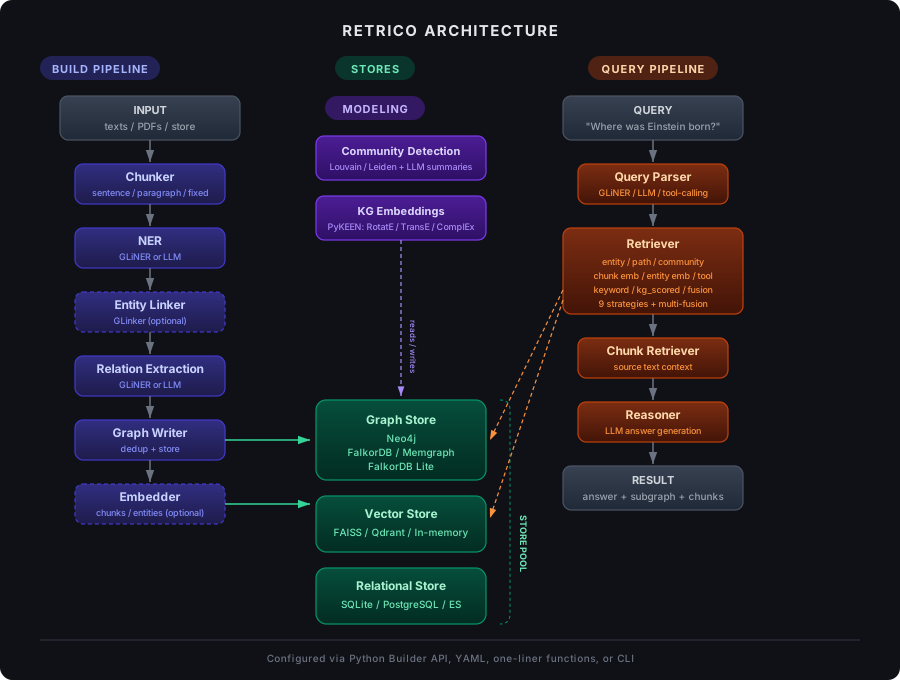
The build pipeline (left) processes text through chunking, NER, entity linking, relation extraction, and graph writing, with optional embedding. The modeling layer (center-top) adds community detection and KG embeddings on top of the stored graph. The query pipeline (right) parses a question, retrieves relevant subgraphs using any of 8+ strategies, fetches source chunks, and generates an answer via LLM reasoning. All pipelines share connections through a unified store pool (center).
Key concepts:
- DAG Execution — Processors execute in dependency order with automatic data flow between nodes
- Processor Registry — All processors are registered by name and instantiated from config dicts
- Lazy Loading — Models (GLiNER, LLMs, embeddings) are loaded on first use, not at pipeline creation
- Uniform Output Shapes — NER backends (
ner_gliner,ner_llm) produce identical output, so they are fully interchangeable
Use Cases
Factual Generation
Build a knowledge graph from your documents and query it to generate factually grounded, non-hallucinated responses. The retrieved subgraph provides explicit evidence for every claim.
Personalization
Capture user-specific knowledge into a personal graph. Use it to improve agentic experiences — the agent remembers context, preferences, and relationships.
Recommendation Systems
Model knowledge graphs and use link prediction (KG embeddings) or community structure to suggest relevant items, connections, or content.
Knowledge Discovery
Infer new relationships from existing knowledge. Particularly valuable in domains like biology and medicine, where discovering hidden connections between entities can accelerate research.
Better Search
Combine structured graph queries with semantic vector search for more accurate, context-aware retrieval than keyword search alone.
Next Steps
- Quickstart — build your first knowledge graph in under 5 minutes
- Building — configure each pipeline component in detail
- Databases — set up your graph, vector, and relational stores
- Retrieving — choose and combine retrieval strategies
- Modeling — community detection and knowledge graph embeddings
- CLI — command-line interface for all operations
- LLM Tool Use — function calling, Cypher translation, custom tools