Building
This section covers how to construct a knowledge graph from text using RetriCo's build pipeline.
How It Works
The build pipeline processes text through a series of steps:
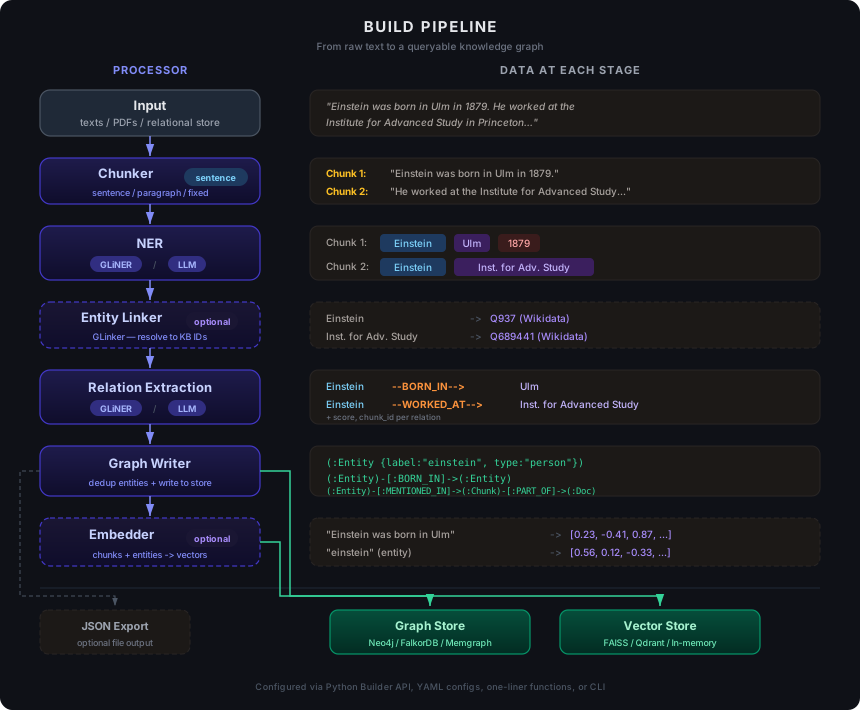
- Chunking — split input texts into manageable pieces
- NER — extract entities from each chunk
- Relation Extraction — discover relationships between entities
- Entity Linking (optional) — resolve entities to a reference knowledge base
- Graph Writing — deduplicate and store entities, relations, and chunks in a graph database
- Embedding (optional) — generate vector embeddings for chunks and/or entities
Each step is a registered processor. Every step can be configured, swapped, or skipped independently.
Creating a Build Pipeline
RetriCo offers three ways to create a build pipeline:
Option 1: One-liner
import retrico

result = retrico.build_graph(
    texts=["Einstein was born in Ulm and worked at the Swiss Patent Office."],
    entity_labels=["person", "organization", "location"],
    relation_labels=["born in", "works at"],
)
Option 2: Builder API
builder = retrico.RetriCoBuilder(name="my_pipeline")
builder.chunker(method="sentence")
builder.ner_gliner(labels=["person", "organization", "location"])
builder.relex_gliner(entity_labels=["person", "organization"], relation_labels=["works at", "born in"])
builder.graph_writer()
executor = builder.build()
result = executor.run(texts=["Einstein was born in Ulm."])
Option 3: YAML Config
name: my_pipeline
nodes:
  - id: chunker
    processor: chunker
    inputs:
      texts: {source: "$input", fields: "texts"}
    output: {key: "chunker_result"}
    config:
      method: sentence

  - id: ner
    processor: ner_gliner
    requires: [chunker]
    inputs:
      chunks: {source: "chunker_result", fields: "chunks"}
    output: {key: "ner_result"}
    config:
      model: "knowledgator/gliner-multitask-large-v0.5"
      labels: [person, organization, location]

  - id: relex
    processor: relex_gliner
    requires: [ner]
    inputs:
      entities: {source: "ner_result", fields: "entities"}
      chunks: {source: "ner_result", fields: "chunks"}
    output: {key: "relex_result"}
    config:
      entity_labels: [person, organization, location]
      relation_labels: [works at, born in]

  - id: writer
    processor: graph_writer
    requires: [relex]
    inputs:
      entities: {source: "relex_result", fields: "entities"}
      relations: {source: "relex_result", fields: "relations"}
      chunks: {source: "relex_result", fields: "chunks"}
    output: {key: "writer_result"}
executor = retrico.ProcessorFactory.create_pipeline("my_pipeline.yaml")
result = executor.run(texts=["Einstein was born in Ulm."])
Connecting to a Database
RetriCo needs a graph database to store the knowledge graph. By default, it uses FalkorDB Lite (embedded, zero-config). To use a different backend:
import retrico

# FalkorDB Lite (default — no setup needed)
result = retrico.build_graph(texts=[...], entity_labels=[...])

# Neo4j
result = retrico.build_graph(
    texts=[...],
    entity_labels=[...],
    store_config=retrico.Neo4jConfig(
        uri="bolt://localhost:7687",
        user="neo4j",
        password="password",
    ),
)

# FalkorDB (server)
result = retrico.build_graph(
    texts=[...],
    entity_labels=[...],
    store_config=retrico.FalkorDBConfig(
        host="localhost",
        port=6379,
        graph="my_graph",
    ),
)

# Memgraph
result = retrico.build_graph(
    texts=[...],
    entity_labels=[...],
    store_config=retrico.MemgraphConfig(
        uri="bolt://localhost:7687",
    ),
)
With the builder API:
builder = retrico.RetriCoBuilder(name="my_pipeline")
builder.graph_store(retrico.Neo4jConfig(uri="bolt://localhost:7687"))
# All downstream components inherit this store
builder.chunker(method="sentence")
builder.ner_gliner(labels=["person", "org"])
builder.graph_writer()
In YAML:
stores:
  graph:
    store_type: neo4j
    uri: "bolt://localhost:7687"
    user: neo4j
    password: password

nodes:
  # ... processors inherit the store automatically
See Databases for full configuration details.
Components
Chunking
The chunker splits input texts into smaller pieces for processing.
Builder API:
builder.chunker(
    method="sentence",  # "sentence", "paragraph", or "fixed"
    max_length=512,     # for "fixed" method
    overlap=50,         # overlap between fixed chunks
)
YAML:
- id: chunker
  processor: chunker
  config:
    method: sentence
    max_length: 512
    overlap: 50
Parameters:
| Parameter | Default | Description |
|---|---|---|
method | "sentence" | Splitting strategy: "sentence", "paragraph", or "fixed" |
max_length | 512 | Maximum chunk length (for "fixed" method) |
overlap | 50 | Token overlap between consecutive fixed chunks |
| Method | Description |
|---|---|
sentence | Split on sentence boundaries (default) |
paragraph | Split on paragraph breaks |
fixed | Fixed-size chunks with optional overlap |
NER (Named Entity Recognition)
RetriCo offers two interchangeable NER backends. Both produce the same output shape ({"entities": List[List[EntityMention]], "chunks": List[Chunk]}), so they can be swapped freely.
GLiNER (Local, Fast)
Runs locally with zero API costs. Supports any entity types — no fine-tuning needed.
Builder API:
builder.ner_gliner(
    model="knowledgator/gliner-multitask-large-v0.5",
    labels=["person", "organization", "location", "date"],
    threshold=0.3,
    flat_ner=True,
    device="cpu",
)
YAML:
- id: ner
  processor: ner_gliner
  requires: [chunker]
  inputs:
    chunks: {source: "chunker_result", fields: "chunks"}
  output: {key: "ner_result"}
  config:
    model: "knowledgator/gliner-multitask-large-v0.5"
    labels: [person, organization, location, date]
    threshold: 0.3
    flat_ner: true
    device: cpu
Parameters:
| Parameter | Default | Description |
|---|---|---|
model | "knowledgator/gliner-multitask-large-v0.5" | HuggingFace model ID or local path |
labels | (required) | Entity types to extract |
threshold | 0.3 | Minimum confidence score |
flat_ner | True | Non-overlapping entities |
device | "cpu" | "cpu" or "cuda" |
LLM (API-based, High Accuracy)
Works with any OpenAI-compatible API: OpenAI, vLLM, Ollama, LM Studio, etc.
Builder API:
builder.ner_llm(
    api_key="sk-...",
    model="gpt-4o-mini",
    labels=["person", "organization", "location"],
    temperature=0.1,
    base_url=None,  # set for local servers
)
YAML:
- id: ner
  processor: ner_llm
  requires: [chunker]
  inputs:
    chunks: {source: "chunker_result", fields: "chunks"}
  output: {key: "ner_result"}
  config:
    api_key: "sk-..."
    model: "gpt-4o-mini"
    labels: [person, organization, location]
    temperature: 0.1
Parameters:
| Parameter | Default | Description |
|---|---|---|
api_key | (required) | OpenAI-compatible API key |
model | "gpt-4o-mini" | LLM model name |
labels | (required) | Entity types to extract |
temperature | 0.1 | LLM sampling temperature |
base_url | None | Custom API endpoint for local servers |
With a local server:
builder.ner_llm(
    base_url="http://localhost:8000/v1",
    api_key="dummy",
    model="Qwen/Qwen2.5-7B-Instruct",
    labels=["person", "organization"],
)
Relation Extraction (Relex)
Like NER, relation extraction offers two interchangeable backends with identical output shapes.
GLiNER-Relex (Local)
Builder API:
builder.relex_gliner(
    model="knowledgator/gliner-relex-large-v0.5",
    entity_labels=["person", "organization", "location"],
    relation_labels=["works at", "born in", "located in"],
    relation_threshold=0.5,
)
YAML:
- id: relex
  processor: relex_gliner
  requires: [ner]
  inputs:
    entities: {source: "ner_result", fields: "entities"}
    chunks: {source: "ner_result", fields: "chunks"}
  output: {key: "relex_result"}
  config:
    model: "knowledgator/gliner-relex-large-v0.5"
    entity_labels: [person, organization, location]
    relation_labels: [works at, born in, located in]
    relation_threshold: 0.5
Parameters:
| Parameter | Default | Description |
|---|---|---|
model | "knowledgator/gliner-relex-large-v0.5" | HuggingFace model ID |
entity_labels | (required) | Entity types |
relation_labels | (required) | Relation types to extract |
relation_threshold | 0.5 | Minimum relation confidence score |
threshold | 0.5 | Entity confidence threshold |
adjacency_threshold | 0.55 | Adjacency scoring threshold |
When used after ner_gliner, it receives pre-extracted entities and only resolves relations — making it faster.
LLM-Relex (API-based)
Builder API:
builder.relex_llm(
    api_key="sk-...",
    model="gpt-4o-mini",
    entity_labels=["person", "organization", "location"],
    relation_labels=["works at", "born in", "located in"],
)
YAML:
- id: relex
  processor: relex_llm
  requires: [ner]
  inputs:
    entities: {source: "ner_result", fields: "entities"}
    chunks: {source: "ner_result", fields: "chunks"}
  output: {key: "relex_result"}
  config:
    api_key: "sk-..."
    model: "gpt-4o-mini"
    entity_labels: [person, organization, location]
    relation_labels: [works at, born in, located in]
Parameters:
| Parameter | Default | Description |
|---|---|---|
api_key | (required) | OpenAI-compatible API key |
model | "gpt-4o-mini" | LLM model name |
entity_labels | (required) | Entity types |
relation_labels | (required) | Relation types to extract |
temperature | 0.1 | LLM sampling temperature |
base_url | None | Custom API endpoint |
Mixed Pipeline (Best of Both)
Use GLiNER for fast local NER, then LLM for higher-quality relation extraction:
builder = retrico.RetriCoBuilder(name="mixed")
builder.chunker(method="sentence")
builder.ner_gliner(labels=["person", "org", "location"])
builder.relex_llm(
    api_key="sk-...",
    entity_labels=["person", "org", "location"],
    relation_labels=["works at", "born in"],
)
builder.graph_writer()
In YAML — just change the processor field:
nodes:
  - id: ner
    processor: ner_gliner            # local GLiNER
    config:
      labels: [person, org, location]

  - id: relex
    processor: relex_llm             # LLM-based relex
    requires: [ner]
    config:
      api_key: "sk-..."
      entity_labels: [person, org, location]
      relation_labels: [works at, born in]
Graph Writer
Deduplicates entities, sanitizes relation types, and writes everything to the graph database.
Builder API:
builder.graph_writer(
    json_output="output/data.json",  # optional: also save to JSON
)
YAML:
- id: writer
  processor: graph_writer
  requires: [relex]
  inputs:
    entities: {source: "relex_result", fields: "entities"}
    relations: {source: "relex_result", fields: "relations"}
    chunks: {source: "relex_result", fields: "chunks"}
  output: {key: "writer_result"}
  config:
    json_output: "output/data.json"
Parameters:
| Parameter | Default | Description |
|---|---|---|
store_type | from pool | Graph database type (auto-resolved from store pool) |
json_output | None | Path to save extracted data as JSON |
Embedding
Generate vector embeddings for chunks and entities during the build phase. These enable semantic retrieval at query time.
Builder API:
builder.chunk_embedder(
    embedding_method="sentence_transformer",
    model_name="all-MiniLM-L6-v2",
    vector_store_type="faiss",
)

builder.entity_embedder(
    embedding_method="sentence_transformer",
    model_name="all-MiniLM-L6-v2",
    vector_store_type="in_memory",
)
YAML:
- id: chunk_embedder
  processor: chunk_embedder
  requires: [writer]
  config:
    embedding_method: sentence_transformer
    model_name: "all-MiniLM-L6-v2"
    vector_store_type: faiss

- id: entity_embedder
  processor: entity_embedder
  requires: [writer]
  config:
    embedding_method: sentence_transformer
    model_name: "all-MiniLM-L6-v2"
    vector_store_type: in_memory
Parameters:
| Parameter | Default | Description |
|---|---|---|
embedding_method | "sentence_transformer" | "sentence_transformer" or "openai" |
model_name | "all-MiniLM-L6-v2" | Embedding model name |
vector_store_type | "in_memory" | "in_memory", "faiss", or "qdrant" |
Entity Linking
Resolve extracted entities to a reference knowledge base using GLinker:
Builder API:
builder.linker(
    model="knowledgator/gliner-linker-large-v1.0",
    entities="data/entities.jsonl",
    threshold=0.5,
)
YAML:
- id: linker
  processor: entity_linker
  requires: [ner]
  config:
    model: "knowledgator/gliner-linker-large-v1.0"
    entities: "data/entities.jsonl"
    threshold: 0.5
Parameters:
| Parameter | Default | Description |
|---|---|---|
model | (required) | GLinker model name |
entities | (required) | Path to reference entity file (JSONL) |
threshold | 0.5 | Minimum linking confidence |
Linked entities get a linked_entity_id that is used for deduplication in the graph writer and entity lookup during retrieval.
PDF Parsing
Build a knowledge graph directly from PDF files:
result = retrico.build_graph_from_pdf(
    pdf_paths=["paper.pdf", "report.pdf"],
    entity_labels=["person", "organization", "concept"],
    relation_labels=["authored", "references", "describes"],
)
The PDF reader extracts text and converts tables to Markdown before passing to the pipeline.
Extraction Without a Database
You can run the extraction pipeline independently of graph writing. This is useful for inspecting results, exporting to other systems, or working offline.
Standalone Extraction
retrico.extract() runs NER and relation extraction and returns an ExtractionResult — no database, no graph writer, no pipeline setup:
import retrico

result = retrico.extract(
    texts=[
        "Acme Corporation was founded by John Smith in San Francisco.",
        "Sarah Johnson joined Acme as CTO in 2015.",
    ],
    entity_labels=["person", "organization", "location"],
    relation_labels=["founded_by", "works_at", "located_in"],
)

# Per-text entity mentions (list of lists, one inner list per input text)
for i, text_entities in enumerate(result.entities):
    print(f"Text {i}:")
    for entity in text_entities:
        print(f"  [{entity.label}] {entity.text} (score: {entity.score:.2f})")

# Per-text relations
for i, text_relations in enumerate(result.relations):
    for rel in text_relations:
        print(f"  {rel.head_text} --[{rel.relation_type}]--> {rel.tail_text}")
Works with both backends:
# GLiNER (default — local, no API key)
result = retrico.extract(texts=[...], entity_labels=[...], method="gliner")

# LLM (any OpenAI-compatible API)
result = retrico.extract(
    texts=[...],
    entity_labels=[...],
    relation_labels=[...],
    method="llm",
    api_key="sk-...",
    model="gpt-4o-mini",
)
Pipeline Extraction to JSON
Use the builder API with graph_writer(json_output=...) to run the full pipeline and save results to a JSON file. The JSON uses the same format as ingest_data(), so you can re-import it into any database later:
import retrico

builder = retrico.RetriCoBuilder(name="extract_only")
builder.chunker(method="sentence")
builder.ner_gliner(
    labels=["person", "organization", "location", "date"],
    threshold=0.3,
)
builder.relex_gliner(
    entity_labels=["person", "organization", "location", "date"],
    relation_labels=["works at", "founded by", "located in"],
)
builder.graph_writer(json_output="output/extracted.json")

executor = builder.build(verbose=True)
result = executor.run(texts=[
    "Acme Corporation was founded by John Smith in 2010. "
    "The company is headquartered in San Francisco.",
])
The output file (output/extracted.json) contains a list of documents with their entities and relations:
[
  {
    "text": "Acme Corporation was founded by John Smith in 2010. ...",
    "entities": [
      {"text": "Acme Corporation", "label": "organization"},
      {"text": "John Smith", "label": "person"},
      {"text": "San Francisco", "label": "location"},
      {"text": "2010", "label": "date"}
    ],
    "relations": [
      {"head": "Acme Corporation", "tail": "John Smith", "type": "founded by"},
      {"head": "Acme Corporation", "tail": "San Francisco", "type": "located in"}
    ]
  }
]
You can later ingest this JSON into any supported database:
import json

with open("output/extracted.json") as f:
    data = json.load(f)

retrico.ingest_data(
    data=data,
    store_config=retrico.Neo4jConfig(uri="bolt://localhost:7687"),
)
One-liner JSON Export
The build_graph() convenience function also supports json_output:
result = retrico.build_graph(
    texts=[...],
    entity_labels=["person", "organization"],
    relation_labels=["works at", "founded by"],
    json_output="output/data.json",
)
This writes to both the graph database and the JSON file. The JSON file is a portable snapshot that can be version-controlled, shared, or re-ingested independently.
Ingesting Structured Data
If you already have structured entities and relations (e.g. from an external source, a CSV, or a previous export), write them directly to the graph — no chunking, NER, or relation extraction needed.
ingest_data() convenience function
import retrico

ctx = retrico.ingest_data(
    data=[
        {
            "entities": [
                {"text": "Albert Einstein", "label": "person"},
                {"text": "Ulm", "label": "location"},
                {"text": "Princeton University", "label": "organization"},
            ],
            "relations": [
                {"head": "Albert Einstein", "tail": "Ulm", "type": "born_in", "score": 1.0},
                {"head": "Albert Einstein", "tail": "Princeton University", "type": "works_at"},
            ],
        },
    ],
)

stats = ctx.get("writer_result")
print(f"Entities: {stats['entity_count']}, Relations: {stats['relation_count']}")
You can also group entities and relations per document with source text and metadata (same format as JSON export):
result = retrico.ingest_data(
    data=[
        {
            "entities": [
                {"text": "Einstein", "label": "person", "properties": {"birth_year": 1879}},
                {"text": "Ulm", "label": "location"},
            ],
            "relations": [
                {"head": "Einstein", "tail": "Ulm", "type": "born_in"},
            ],
            "text": "Einstein was born in Ulm.",
            "metadata": {"source": "wikipedia"},
        },
    ],
)
Input Format
Entities — each dict requires text and label:
{"text": "Einstein", "label": "person"}                          # minimal
{"text": "Einstein", "label": "person", "id": "Q937"}           # explicit ID (used for dedup)
{"text": "Einstein", "label": "person", "score": 0.95}          # with confidence
{"text": "Einstein", "label": "person", "properties": {"birth_year": 1879}}  # with properties
Relations — each dict requires head, tail, and type:
{"head": "Einstein", "tail": "Ulm", "type": "born_in"}                          # minimal
{"head": "Einstein", "tail": "Ulm", "type": "born_in", "score": 0.9}            # with score
{"head": "Einstein", "tail": "Ulm", "type": "born_in", "head_label": "person",
 "tail_label": "location", "properties": {"year": 1879}}                         # full
{"head": "Einstein", "tail": "ETH Zurich", "type": "worked_at",
 "start_date": "1912-01-01", "end_date": "1914-03-01"}                           # temporal
The head and tail values must match an entity text (case-insensitive).
Ingest Builder API
from retrico import RetriCoIngest

builder = RetriCoIngest(name="my_ingest")
builder.graph_writer(
    store_type="memgraph",
    memgraph_uri="bolt://localhost:7687",
)

executor = builder.build()
ctx = executor.run({
    "entities": [
        {"text": "Einstein", "label": "person"},
        {"text": "Ulm", "label": "location"},
    ],
    "relations": [
        {"head": "Einstein", "tail": "Ulm", "type": "born_in"},
    ],
})

# Save config for reproducibility
builder.save("configs/ingest.yaml")
Ingesting from a JSON File
The ingest format is designed to be loaded directly from JSON:
import json
import retrico

with open("data/knowledge_graph.json") as f:
    data = json.load(f)

ctx = retrico.ingest_data(data=data)
Building from a Relational Store
Instead of passing texts directly, pull them from an existing relational database using the store_reader processor.
Pipeline: store_reader → chunker → NER → relex → graph_writer
build_graph_from_store() convenience function
import retrico

result = retrico.build_graph_from_store(
    table="articles",
    text_field="body",
    id_field="article_id",
    metadata_fields=["author", "date"],
    relational_store_type="sqlite",
    sqlite_path="/data/articles.db",
    entity_labels=["person", "organization", "location"],
    relation_labels=["works at", "born in"],
    limit=1000,
    offset=0,
    filter_empty=True,
)
Builder API
builder = retrico.RetriCoBuilder(name="from_store")
builder.chunk_store(type="sqlite", sqlite_path="/data/articles.db")
builder.store_reader(
    table="articles",
    text_field="body",
    id_field="article_id",
    metadata_fields=["author", "date"],
    limit=500,
)
builder.chunker(method="sentence")
builder.ner_gliner(labels=["person", "organization", "location"])
builder.relex_gliner(
    entity_labels=["person", "organization", "location"],
    relation_labels=["works at", "born in"],
)
builder.graph_writer()

executor = builder.build(verbose=True)
result = executor.run({})  # empty input — store_reader provides texts
Works with PostgreSQL and Elasticsearch too:
# PostgreSQL
builder.chunk_store(type="postgres", postgres_host="localhost", postgres_database="mydb")
builder.store_reader(table="documents", text_field="content")

# Elasticsearch
builder.chunk_store(type="elasticsearch", elasticsearch_url="http://localhost:9200")
builder.store_reader(table="articles", text_field="text")
Without store_reader(), the pipeline behaves exactly as before — the chunker reads from $input.texts.
Building from PDF Files
Extract text and tables from PDF documents and build a knowledge graph. Uses pdfminer.six for layout analysis and pdfplumber for table extraction.
Pipeline: pdf_reader → NER → relex → graph_writer
Each PDF page becomes one chunk. Tables are detected and converted to Markdown format.
pip install 'retrico[pdf]'
build_graph_from_pdf() convenience function
result = retrico.build_graph_from_pdf(
    pdf_paths=["reports/annual_report.pdf", "papers/research.pdf"],
    entity_labels=["person", "organization", "location"],
    relation_labels=["works at", "born in"],
    extract_tables=True,
    page_ids=None,  # None = all pages, or [0, 1, 2] for specific pages
)
Builder API
builder = retrico.RetriCoBuilder(name="pdf_pipeline")
builder.pdf_reader(
    extract_text=True,
    extract_tables=True,
    page_ids=None,
)
builder.ner_gliner(labels=["person", "organization", "location"])
builder.relex_gliner(
    entity_labels=["person", "organization", "location"],
    relation_labels=["works at", "born in"],
)
builder.graph_writer()

executor = builder.build(verbose=True)
result = executor.run(pdf_paths=["document.pdf"])
How it works
- Layout analysis — pdfminer.six extracts page elements
- Table detection — pdfplumber identifies table structures
- Table → Markdown — tables are converted to pipe-separated Markdown
- Page chunking — each page becomes a
Chunkwith metadata{"page_number": N, "source_pdf": "filename.pdf"} - Document creation — one
Documentper PDF file
Page-level chunking (without PDF reader)
If you already have page-separated text, use the "page" chunking method:
builder.chunker(method="page")  # splits on \f characters
text = "Page 1 content here...\fPage 2 content here..."
Accessing Intermediate Results
build_graph() and executor.run() return a PipeContext containing every pipeline stage output:
result = retrico.build_graph(texts=..., entity_labels=...)

# Chunks produced by the chunker
chunks = result.get("chunker_result")["chunks"]

# Per-chunk entity mentions from NER
entities = result.get("ner_result")["entities"]  # List[List[EntityMention]]

# Linked entities (if linker was enabled)
linked = result.get("linker_result")["entities"]

# Per-chunk relations (if relex was enabled)
relations = result.get("relex_result")["relations"]  # List[List[Relation]]

# Final write stats + deduplicated entity map
writer = result.get("writer_result")
print(writer["entity_count"], writer["relation_count"])
entity_map = writer["entity_map"]  # dedup_key -> Entity

# Embedding stats (if embedders were enabled)
chunk_emb = result.get("chunk_embedder_result")
entity_emb = result.get("entity_embedder_result")
Available Processors
| Processor | Description | Key config |
|---|---|---|
store_reader | Pull texts from a relational store | table, text_field, id_field, metadata_fields, limit |
pdf_reader | Extract text + tables from PDFs | extract_text, extract_tables, page_ids |
chunker | Split text into chunks | method (sentence/paragraph/fixed/page), chunk_size, overlap |
ner_gliner | Entity extraction with GLiNER | model, labels, threshold, device |
ner_llm | Entity extraction with LLM | model, labels, api_key, base_url |
entity_linker | Entity linking with GLinker | executor, model, threshold, entities |
relex_gliner | Relation extraction with GLiNER-relex | model, entity_labels, relation_labels, relation_threshold |
relex_llm | Relation extraction with LLM | model, entity_labels, relation_labels, api_key |
data_ingest | Convert flat JSON to graph_writer format | (internal) |
graph_writer | Deduplicate and write to graph store | store_type, json_output, setup_indexes |
chunk_embedder | Embed chunk texts into vector store | embedding_method, model_name, vector_store_type |
entity_embedder | Embed entity labels into vector store | embedding_method, model_name, vector_store_type |
query_parser | Extract entities from a query | method (gliner/llm/tool), labels, api_key |
retriever | Look up entities + k-hop subgraph | max_hops |
path_retriever | Shortest paths between parsed entities | max_path_length, max_pairs |
community_retriever | Vector search communities | top_k, max_hops |
entity_embedding_retriever | Vector search entities | top_k, max_hops |
chunk_embedding_retriever | Vector search chunks | top_k, max_hops |
tool_retriever | LLM agent with graph tools | api_key, model, max_tool_rounds |
keyword_retriever | Full-text search chunks | top_k, search_source |
fusion | Merge multiple retriever subgraphs | strategy, top_k |
chunk_retriever | Fetch source chunks for entities | max_chunks, chunk_entity_source |
reasoner | LLM multi-hop reasoning | api_key, model |
community_detector | Community detection | method, levels, resolution |
community_summarizer | LLM summaries for communities | api_key, model, top_k |
community_embedder | Embed community summaries | embedding_method, model_name |
kg_triple_reader | Read triples from graph store or TSV | source, train_ratio |
kg_trainer | Train PyKEEN KG embedding model | model, embedding_dim, epochs |
kg_embedding_storer | Store trained KG embeddings | model_path, vector_store_type |
kg_scorer | Score triples, predict links | model_path, top_k, predict_tails |
Graph Schema
RetriCo writes the following node and relationship types to the graph database:
(:Entity {id, label, entity_type, properties})
(:Chunk {id, document_id, text, index, start_char, end_char})
(:Document {id, source, metadata})

(entity)-[:MENTIONED_IN {start, end, score, text}]->(chunk)
(entity)-[:RELATION_TYPE {score, chunk_id, id}]->(entity)
(chunk)-[:PART_OF]->(document)
- Entities are deduplicated by canonical name (
label.strip().lower()) - Relation types are sanitized: spaces become underscores, uppercased (e.g.
"born in"becomesBORN_IN)
Full YAML Configuration Reference
GLiNER Build Pipeline
name: build_gliner
stores:
  graph:
    store_type: neo4j
    uri: "bolt://localhost:7687"
    user: neo4j
    password: password

nodes:
  - id: chunker
    processor: chunker
    inputs:
      texts: {source: "$input", fields: "texts"}
    output: {key: "chunker_result"}
    config:
      method: sentence

  - id: ner
    processor: ner_gliner
    requires: [chunker]
    inputs:
      chunks: {source: "chunker_result", fields: "chunks"}
    output: {key: "ner_result"}
    config:
      model: "knowledgator/gliner-multitask-large-v0.5"
      labels: [person, organization, location, date]
      threshold: 0.3
      flat_ner: true
      device: cpu

  - id: relex
    processor: relex_gliner
    requires: [ner]
    inputs:
      entities: {source: "ner_result", fields: "entities"}
      chunks: {source: "ner_result", fields: "chunks"}
    output: {key: "relex_result"}
    config:
      model: "knowledgator/gliner-relex-large-v0.5"
      entity_labels: [person, organization, location, date]
      relation_labels: [works at, born in, located in, developed]
      relation_threshold: 0.5

  - id: writer
    processor: graph_writer
    requires: [relex]
    inputs:
      entities: {source: "relex_result", fields: "entities"}
      relations: {source: "relex_result", fields: "relations"}
      chunks: {source: "relex_result", fields: "chunks"}
      documents: {source: "chunker_result", fields: "documents"}
    output: {key: "writer_result"}
All-LLM Build Pipeline
name: build_llm
stores:
  graph:
    store_type: neo4j
    uri: "bolt://localhost:7687"

nodes:
  - id: chunker
    processor: chunker
    inputs:
      texts: {source: "$input", fields: "texts"}
    output: {key: "chunker_result"}
    config:
      method: sentence

  - id: ner
    processor: ner_llm
    requires: [chunker]
    inputs:
      chunks: {source: "chunker_result", fields: "chunks"}
    output: {key: "ner_result"}
    config:
      api_key: "sk-..."
      model: "gpt-4o-mini"
      labels: [person, organization, location]
      temperature: 0.1

  - id: relex
    processor: relex_llm
    requires: [ner]
    inputs:
      entities: {source: "ner_result", fields: "entities"}
      chunks: {source: "ner_result", fields: "chunks"}
    output: {key: "relex_result"}
    config:
      api_key: "sk-..."
      model: "gpt-4o-mini"
      entity_labels: [person, organization, location]
      relation_labels: [works at, born in, located in]

  - id: writer
    processor: graph_writer
    requires: [relex]
    inputs:
      entities: {source: "relex_result", fields: "entities"}
      relations: {source: "relex_result", fields: "relations"}
      chunks: {source: "relex_result", fields: "chunks"}
    output: {key: "writer_result"}
Mixed Pipeline (GLiNER NER + LLM Relex)
name: build_mixed
stores:
  graph:
    store_type: falkordb_lite

nodes:
  - id: chunker
    processor: chunker
    inputs:
      texts: {source: "$input", fields: "texts"}
    output: {key: "chunker_result"}
    config:
      method: sentence

  - id: ner
    processor: ner_gliner
    requires: [chunker]
    inputs:
      chunks: {source: "chunker_result", fields: "chunks"}
    output: {key: "ner_result"}
    config:
      labels: [person, organization, location]
      threshold: 0.3

  - id: relex
    processor: relex_llm
    requires: [ner]
    inputs:
      entities: {source: "ner_result", fields: "entities"}
      chunks: {source: "ner_result", fields: "chunks"}
    output: {key: "relex_result"}
    config:
      api_key: "sk-..."
      model: "gpt-4o-mini"
      entity_labels: [person, organization, location]
      relation_labels: [works at, born in]

  - id: writer
    processor: graph_writer
    requires: [relex]
    inputs:
      entities: {source: "relex_result", fields: "entities"}
      relations: {source: "relex_result", fields: "relations"}
      chunks: {source: "relex_result", fields: "chunks"}
    output: {key: "writer_result"}
Build Pipeline with Embeddings
name: build_with_embeddings
stores:
  graph:
    store_type: neo4j
    uri: "bolt://localhost:7687"
  vector:
    store_type: faiss

nodes:
  - id: chunker
    processor: chunker
    inputs:
      texts: {source: "$input", fields: "texts"}
    output: {key: "chunker_result"}
    config:
      method: sentence

  - id: ner
    processor: ner_gliner
    requires: [chunker]
    inputs:
      chunks: {source: "chunker_result", fields: "chunks"}
    output: {key: "ner_result"}
    config:
      labels: [person, organization, location]

  - id: relex
    processor: relex_gliner
    requires: [ner]
    inputs:
      entities: {source: "ner_result", fields: "entities"}
      chunks: {source: "ner_result", fields: "chunks"}
    output: {key: "relex_result"}
    config:
      entity_labels: [person, organization, location]
      relation_labels: [works at, born in]

  - id: writer
    processor: graph_writer
    requires: [relex]
    inputs:
      entities: {source: "relex_result", fields: "entities"}
      relations: {source: "relex_result", fields: "relations"}
      chunks: {source: "relex_result", fields: "chunks"}
    output: {key: "writer_result"}

  - id: chunk_embedder
    processor: chunk_embedder
    requires: [writer]
    config:
      embedding_method: sentence_transformer
      model_name: "all-MiniLM-L6-v2"
      vector_store_type: faiss

  - id: entity_embedder
    processor: entity_embedder
    requires: [writer]
    config:
      embedding_method: sentence_transformer
      model_name: "all-MiniLM-L6-v2"
      vector_store_type: in_memory